

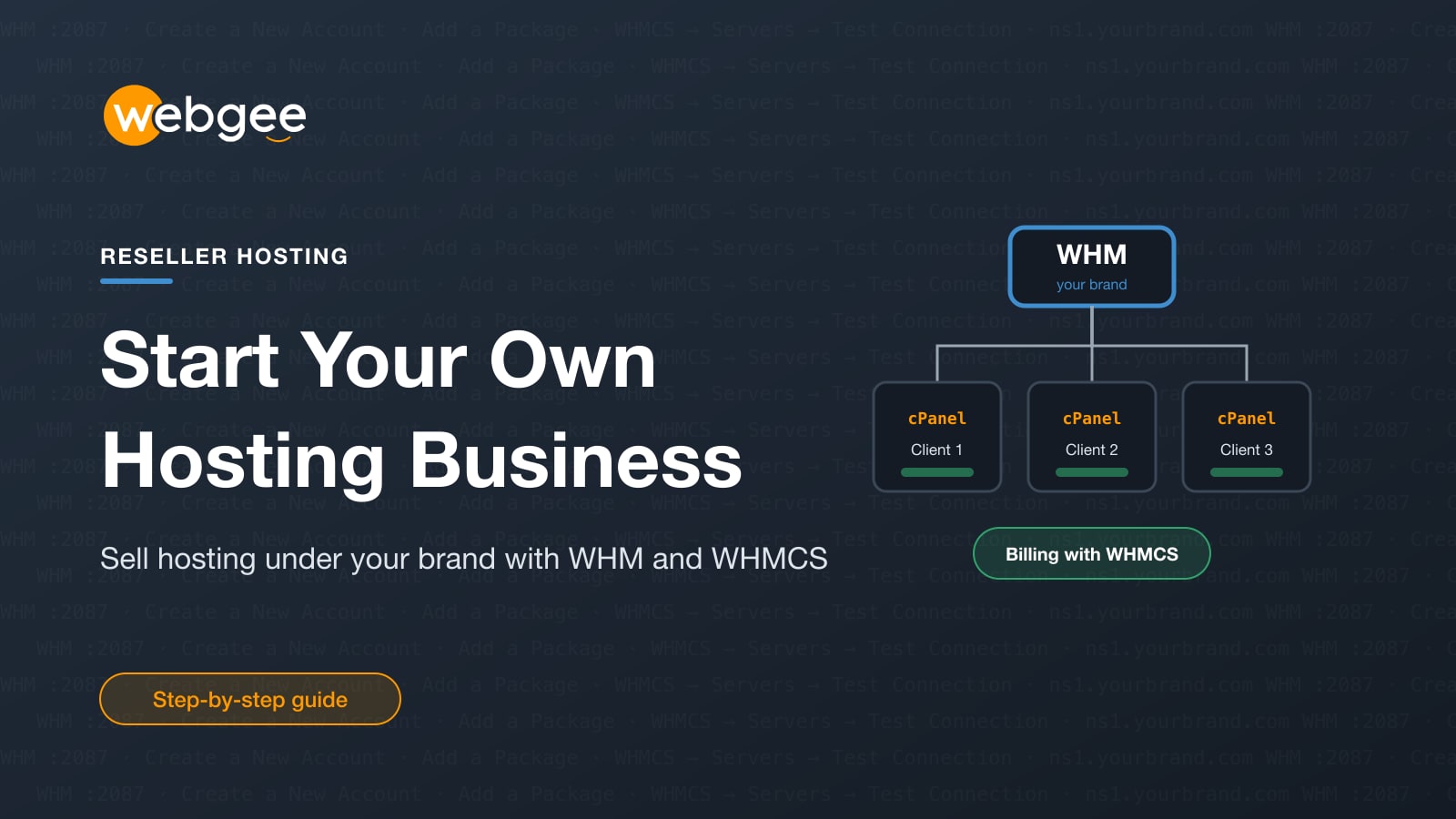
If you build or look after websites for clients, you are probably already doing a hosting company's job without being paid for it. You choose the host, set up the account, fix the email, renew the domain and answer the call when the site goes down. Reseller hosting turns that work into a product you can charge for every month.
This guide is for agencies, freelancers and IT consultants who want to start selling hosting under their own brand. It covers why reselling makes sense, what a WebGee reseller plan gives you, how to set up your first packages and client accounts in WHM, how to connect WHMCS for billing and automation, how to sell in more than one region, and how to price your own plans.
Key takeaways
- Reselling hosting turns the site care you already do for clients into recurring revenue.
- WHM creates packages and cPanel accounts; WHMCS handles billing, invoices and automatic provisioning.
- Package limits must fit inside your plan's total, or WHM will not create them.
- To sell in several regions, hold one reseller plan per region; additional plans are discounted.
- Price on your costs and the support you provide, not on disk space alone.
Why hosting is good recurring revenue for an agency
Project work is lumpy. A website build pays once, then the client goes quiet until the next redesign. Hosting is the opposite: a small amount, billed every month or year, for as long as the site is live.
For an agency, reselling hosting has a few practical advantages:
- Predictable income. Twenty or fifty clients on monthly plans add up to a baseline that covers fixed costs before any project lands.
- Control over the stack. Every client site lives on a platform you know, with the same control panel, PHP setup and backup process.
- Faster support. When something breaks you can log in and look, rather than waiting for a client to dig out a password for a host you have never used.
It is worth being clear about what you take on. Reseller hosting is a business, not a one-click product. WebGee looks after the server hardware, network, platform updates and security, and supports you. You support your clients, handle their billing and provision their accounts. The docs page What running a hosting business involves sets out where that line falls.
Your clients are yours WebGee supports you, not your clients, and has no relationship with them or visibility of your billing. Plan how you will answer their questions, including at inconvenient hours. This is the part most often underestimated.
What you get with a WebGee reseller plan
A WebGee reseller plan is a cPanel and WHM platform for running client accounts under your own brand. The main pieces are:
- WHM (WebHost Manager). Your control panel as the reseller. You use it to create packages and cPanel accounts, suspend non-payers, edit DNS and log in to any client's cPanel without asking for their password.
- cPanel for each client. Every client gets their own cPanel account with its own files, databases and email.
- White-label branding. The plans are 100% white-label: you can customise cPanel with your own logo and branding, and custom nameservers are included free on all reseller plans, so clients point their domains at your brand rather than WebGee's.
- Domain reselling. Every cPanel Reseller and Premium Reseller plan includes access to WebGee's domains reseller platform, with competitive pricing across 1,000+ TLDs and no account opening fees.
- Reseller discounts. Reseller accounts get discounted rates on domain registrations, transfers and renewals, VPS and cloud servers, dedicated servers, and additional reseller plans. Discounts apply automatically at checkout when you are signed in to your reseller account, and the current list is under Client Area → Reseller Area → Exclusive Discounts.
- Free migration. If you already host client sites elsewhere, WebGee's migration team moves websites, email and databases for free. See free migration.
Where WHMCS fits in
WHM creates hosting accounts. It does not take payments, send invoices or run a client portal. That is what WHMCS is for: it provisions, suspends and terminates accounts automatically when clients pay or miss a renewal, and gives clients one place to manage their services, invoices and support tickets.
WebGee is a WHMCS Authorized Reseller. Premium Reseller plans include a free WHMCS Starter licence, which covers up to 250 client accounts and carries the standard "Powered by WHMCS" link in the client area footer. On other reseller plans, WHMCS licences are available at exclusive reseller pricing, from $8.95/mo for the branded Starter tier; see WHMCS licences for the tiers. A WHMCS licence from WebGee is tied to your reseller plan, so cancelling the plan ends the licence.
Step 1: Sign in to WHM and set up the basics
WHM runs on port 2087. Once your domain points at the server, sign in at https://yourdomain.com:2087; before that, use https://your-server-hostname:2087. Your credentials are in your welcome email, and you can also open WHM from the WHM icon in your own cPanel.
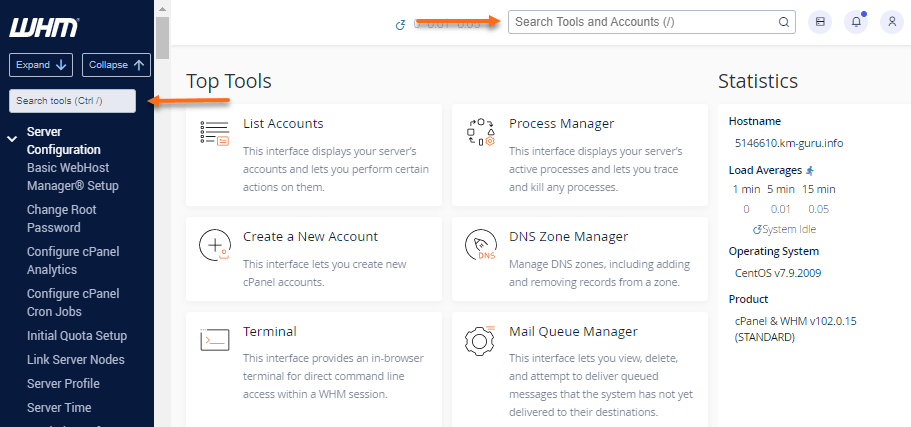
The quickest way around WHM is the search box. Type the name of the tool you want and it filters the menu for you.
Before you create any client accounts, set up two things that are much easier to do first:
- Custom nameservers, such as
ns1.youragency.comandns2.youragency.com, so clients never see WebGee's. See Create custom nameservers. - A DNS zone template, if every client needs the same records. Under Edit Zone Templates you can add an SPF record or a
CNAMEfor a service you provide. Templates only apply to newly created domains (or zones you reset), so do this before you onboard clients, and test it on a throwaway account first. See Customise DNS zone templates.
Step 2: Create packages that fit your plan
A package is a product you sell: a set of limits such as disk quota and bandwidth that WHM applies to every account created on it. Create them under Packages → Add a Package before you create accounts.
The most important rule is that a package's limits must fit within your reseller plan's total. WHM refuses to create a package whose disk quota exceeds what your plan allows, and that includes setting the quota to unlimited. Bandwidth works the same way.
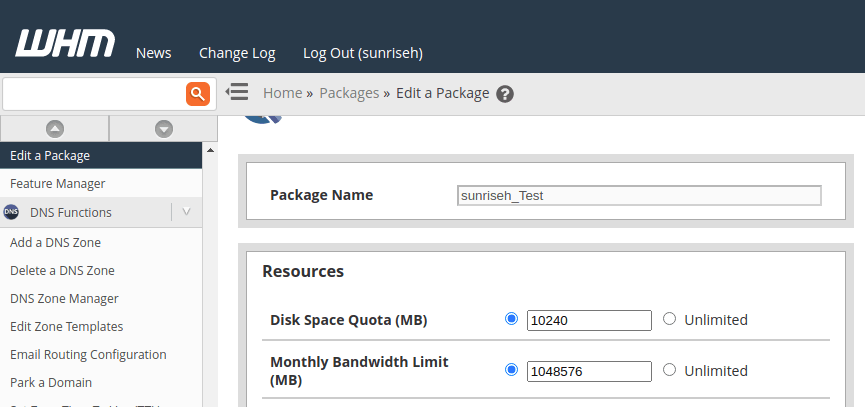
Size packages for the accounts you plan to sell Divide your plan's storage by the number of accounts you intend to sell, not the number you have today. A 50 GB plan sold as ten 5 GB accounts is fully committed; sold as ten 20 GB accounts it is oversold, and WHM will not let you create that package.
If you want a plan that includes SSH, enable Shell Access in the package so new accounts get it automatically. Editing a package changes what new accounts get; existing accounts on it are not updated retroactively. See Enable SSH for a customer's account.
Step 3: Create a client's cPanel account
With a package ready, creating an account takes a minute:
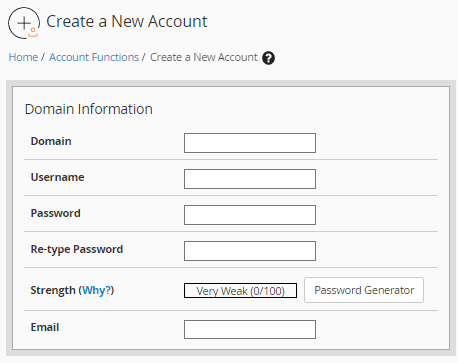
- In WHM, search for Create a New Account.
- Enter the client's domain, a username, a password and their contact email.
- Choose the package that sets the account's limits.
- Select Create.
From then on, List Accounts is where you search for, log in to, suspend or terminate accounts. The orange cP icon beside a domain opens that client's cPanel without their password, which means you can help without interrupting them.
Suspend before you terminate Terminate an Account deletes files, databases and email, and cannot be undone. While anything is in doubt, such as a late payment, suspend instead. Suspension is reversible and takes the site offline just the same.
Selling to other resellers needs a VPS
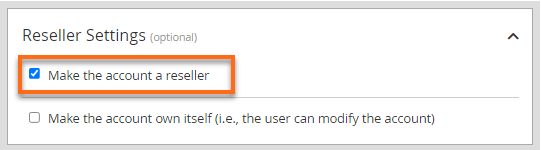
A reseller plan on shared hosting cannot create further resellers; that requires root WHM on a VPS or dedicated server. If you later want to offer reseller accounts of your own, the account is created the same way with Make the account a reseller ticked under Reseller Settings. Set the new reseller's limits before you hand over the credentials. See Create a reseller account in WHM.
Step 4: Connect WHMCS for billing and automation
You can run a few clients from WHM alone, but invoicing and provisioning by hand stops scaling quickly. WHMCS connects your storefront to WHM so accounts are created when a client pays.
- Install WHMCS. In cPanel, open Softaculous Apps Installer, search for WHMCS and install it with your licence key. A subdomain such as
billing.youragency.comis the usual choice. Leave In Directory empty unless you want a subdirectory, because the licence is tied to the domain, IP address and directory it was issued for. Afterwards, delete theinstalldirectory, setconfiguration.phpto permissions400and add the WHMCS cron job. See Install WHMCS with Softaculous. - Generate a WHM API token. In WHM, go to Development → Manage API Tokens, generate a token named something like
whmcsand copy it. It is shown only once. Restrict it to your WHMCS server's IP address so a leaked token is useless anywhere else. See Restrict WHM API tokens by IP. - Add the server in WHMCS. Under Setup → Products/Services → Servers, add a server of type cPanel with your reseller username and the API token, tick Secure and use port
2087. Select Test Connection and save only once it passes. See Add a server to WHMCS. - Link each product to a WHM package. In each WHMCS product's Module Settings, choose the cPanel module and the WHM package it should provision.
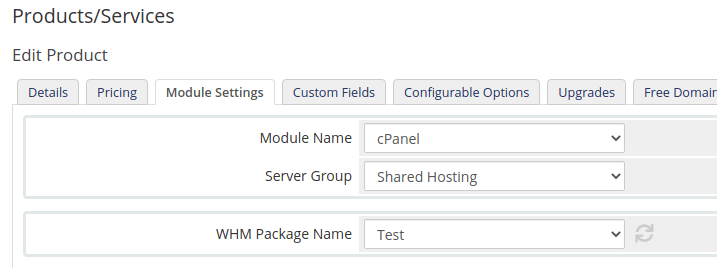
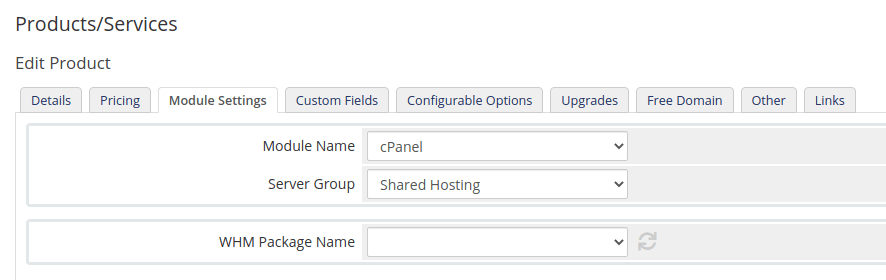
If the WHM Package Name list is empty, the package was almost certainly never created in WHM because its limits exceed your plan. Check Packages → List Packages in WHM, fix the disk and bandwidth values, then re-fetch the list from Module Settings. Also make sure WHMCS connects as the same reseller that owns the packages.
Send WHMCS email over SMTP
By default WHMCS sends mail with PHP's mail function, which is unauthenticated and fails SPF and DKIM checks. For a billing system that means invoices and password resets landing in spam. Switch it to SMTP before you take your first order:
- Create a mailbox on the domain WHMCS sends from, for example
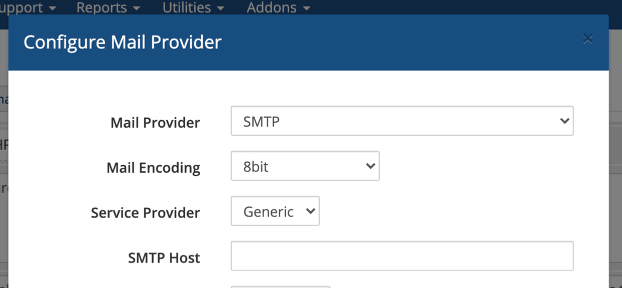
[email protected]. A Gmail or Outlook address will not work. - In WHMCS, go to Configuration → System Settings → General Settings → Mail and select Configure Mail Provider.
- Choose SMTP and enter host
mail.webgee.com, port465, SSL typeSSL, the full email address as the username, and the mailbox password.

Port and SSL type must match Port 465 requires SSL and port 587 requires TLS. Mixing them is the most common reason WHMCS fails to send.
Selling in more than one region
If your clients are spread across countries, location matters. Physical distance adds latency to every request, and some clients need their data kept in a particular jurisdiction.
A WebGee reseller plan lives in one region, chosen when you order it, and every account inside it lives there too. To sell in several regions, hold a reseller plan in each and create each client's account on the plan closest to them or their visitors. Additional reseller plans carry a discount; it applies from your second plan, not your first.
A few things to know when you run several plans:
- Add each plan as a separate server in one WHMCS installation, then choose where to provision.
- Packages do not sync between WHMs, so recreate them on each plan.
- Custom nameservers can point at whichever plan is primary, so clients need not know how many you hold.
- Moving an account between your plans is a migration. Do not use the Migration Center for it; open a ticket and WebGee uses Live Transfer, which keeps the account online.
See Sell hosting in multiple locations for the full reference.
Pricing your own hosting plans
There is no single right price, but there are a few principles that keep reselling profitable:
- Start from your costs. Add up the reseller plan, any WHMCS licence, payment gateway fees and domain costs, then decide how many accounts you need to sell to cover them. Everything above that is margin.
- Sell outcomes, not megabytes. Most small-business clients do not compare disk quotas. Package hosting with things they do value: setup, SSL, backups you have tested, updates, and a named person to call.
- Keep the range small. Two or three plans are easier to explain and support than eight. A starter plan, a business plan and a managed plan cover most agencies.
- Price your time. Support is the cost that grows with every client. If a plan includes WordPress updates or help with email, charge for it.
- Use your discounts. Domains, VPS and dedicated servers bought through your reseller account are discounted, which leaves room for margin when you resell them.
Know what limits matter too. On WebGee shared and reseller hosting, bandwidth is not metered; accounts are constrained by CloudLinux LVE limits on CPU, memory and entry processes. If one client outgrows their share, Resource Boost doubles RAM, CPU and entry processes for that single account. See How much bandwidth is included and Add more resources to one account.
Before you take your first paying client
- Custom nameservers set up on your own domain
- Packages created in WHM with limits that fit your plan
- A test account created and checked, including DNS and email
- WHMCS installed, cron job added and setup files removed
- WHM API token restricted to your WHMCS server's IP
- WHMCS products linked to WHM packages and a test order completed
- WHMCS sending over SMTP from your own domain
- Terms of service, an acceptable use policy and published support hours
Next steps
Start small. Move a handful of your existing clients first, using free migration if they are hosted elsewhere, and refine your packages and support process before you market hosting widely. When you are ready, compare the plans on reseller hosting, or Premium Reseller hosting if you want less contended servers and a WHMCS Starter licence included.
Frequently asked questions
Do I need technical skills to resell hosting?
Some. WebGee manages the servers, platform updates and security, but you create accounts in WHM, run billing and support your own clients. Familiarity with cPanel, DNS and email is a real advantage.
Is WHMCS included with WebGee reseller hosting?
Premium Reseller plans include a free WHMCS Starter licence for up to 250 clients. On other reseller plans you can add a WHMCS licence at exclusive reseller pricing. A licence from WebGee is tied to your reseller plan.
Can my clients see that the hosting comes from WebGee?
The reseller plans are white-label. You can brand cPanel with your own logo and use custom nameservers, which are included free on all reseller plans.
Can I sell hosting in more than one country?
Yes. Each reseller plan lives in one region, so hold a plan in each region you want to serve. Additional plans are discounted, and each can be added as a separate server in one WHMCS installation.
Is bandwidth limited on reseller hosting?
Bandwidth is not metered on WebGee shared and reseller hosting. Accounts are limited by CloudLinux LVE limits on CPU, memory and entry processes, which is the number to watch.
